I have to admit I absolutely love those cool and creative 404 pages some designers do come up with sometimes. Nothing is funkier than getting to a really unexpected and innovative 404 sample following a URL typo.
The problem is there aren’t so many of them around. Ok, you can find loads of posts listing them up, but those posts often show the same works and you have to admit, for the amount of web sites present on the ever-growing 3-w sphere, there doesn’t seem to be a lot of people coming up with decent (if not funny) 404 pages worth a look.

This was the mindset I was in when, a few days ago, I did realize there weren’t so many of them because people (like me) were way too lazy to actually take the time to THINK and DESIGN a DECENT 404 PAGE. Therefore I decided time had come to stop drooling over other people’s work and get things going right at home.
When thinking about my own 404 page, I decided to use one of my earlier photoshop works (Shoogle Designs’ own personal fail whale) and apply it on a larger scale to give this 404 page and cul-de-sac event all its meaning, while making a huge reference to Twitter’s over-capacity feature.

The concept was simple (for a deranged mind like mine): create a 404 page featuring a stack of layers, all responding their own way upon movement of a hovering mouse, while featuring my own and personal fail whale over a number of various and colored waves.
“WTF was that?” is probably what comes initially to your mind. Therefore here’s what I was thinking of in a simple and yet self-explaining drawing:
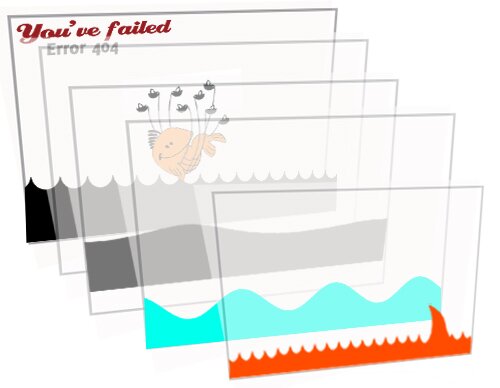
As you can see, each and every layer would remain independent from the others, hence they would have a separate behavior when the mouse hovers over them, giving the visitors a wavy 3d-like effect.
This obviously takes me to the jQuery plugin of the day. As you may know from my various posts, I am not a programmer, I let all of this programming malarkey to people much more talented and knowledgeable than myself, and merely use them to satisfy my own imagination.
So,…jParallax is what I have been using here. There are many demos on the webdev.steph band website (and even many more on other websites). I can only encourage you to check this person’s samples (good work by the way whoever you are, as I can’t find a real reference there).
The code behind jParallax
The code used on the demos looking bit daunting at first glance, I’ve decided to simplify it all and make it understandable for you all jQuery beginners. Here’s what it all comes down to:
A javascript command applied to a div whose id is jparallax.
<script type="text/javascript">
jQuery(document).ready(function(){
        jQuery('#parallax').jparallax();
});
And some HTML/CSS specifying the positioning of a jparallax div, and its children (layer stack):
<div id="parallax">
        <img src="image1" style= “width, height, position…etc” />
        <img src="image2" style= “width, height, position…etc” />
        <img src="image3" style= “width, height, position…etc” />
        <img src="image4" style= “width, height, position…etc” />
        <img src="image5" style= “width, height, position…etc” />
</div>
As mentioned earlier on, it can look daunting at first. But believe me, it will take you longer to find a stacking-layer idea, and photoshop them all one by one than getting the jquery script working.
That’s it, all scripts and demos are for grab on the mentioned website. Do not hesitate to have a go at it, and good luck in creating your own jparallax animations.
Click on demo and check out my own and personal 404 page. Hover over it to see it in action.
Note: you will need to modify your .htaccess file to get your 404 page working on all dead links / url typos.

My name is Flo Preynat and I am the freelance webdesigner and developer behind shoogle designs. I live in France and specialize in responsive web design. Give me a shoogle or get in touch with me on twitter.
Follow @shoogledesigns





Yeah, mate…
That’s fun I am just thinking about using Spritely to animate the 404
Talk to you later & good job.
Maybe you should provied a Download package?
i’d rather people go and check the mentionned website. i dont wanna mislead people and let them think I created the plugin (in case they dont read the whole post and my statement).
In summary, I prefer they go and download the package on the programmer’s website.
Spritely looks like fun indeed…
Imagine you combine jparallax with spritely… could be real funny