
Page created for demonstration purpose
- SCROLL DOWN to see scroll-to-top icon appear -
- HOVER over the icon with your mouse to see it work -
- CLICK on it to go back to the top -
If you are a Wordpress user and most likely Wordpress lover like me, you are more than likely aware that implementing a scroll-to-top link on your site is just as easy as pie. Just go to the plugin section of your Wordpress back end, choose one of the many plugins available (Asvin Balloo's wp-to-top is a very good one for example), activate it and customize the link, color and background color
I was tempted to do this myself, just sit back, relax and click a few times to get this done. But I decided to go the longer way as it would be nice:
earing in mind there is no need to reinvent the wheel, let's Google a scroll-to-top jQuery plugin, and yes: you will find tons. I decided to go with Matt Varone's plugin set (details here) and can only encourage you to go check it out and leave a kind message to this talented designer.
o here we go with the coding.
s Matt brilliantly explains it, you will be needing the jQuery plugin library as usual, his jquery.ui.totop.js script, some css to have the icon showing up, and a double-sided icon (or sprite as Matt calls it), with hover and no-hover states which will give your icon a dynamic and funky effect.
Go back to the blog post to copy the following CSS code:
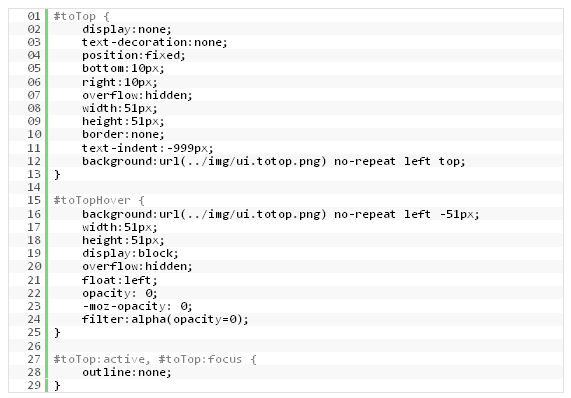
As you can see, we have an icon set to 51px wide and 2x51px high, and two positions for our hover/no-hover states, with a left top positioning of our background image for the no-hover state and a left -51px positioning of the image for our hover state. This will technically shift the image along its y-axis and create a dynamic effect to it.
Obviously, you can choose to apply one (or more) effect(s) to a simple arrow icon if you decide not to go over the top with this. I went with Shoogle, my beloved fishy icon, with a black and white effect on the no-hover side of the pic and a colorful and thumb-up picture for the hover state.

OK this is it people. Click on the demo link, scroll down the page to make the icon appear and don't forget to hover over it with your mouse to flick between hover and no-hover states. Finally click on it and make the plugin take you back to the top.
Happy plugin implementation!