It only takes a peek at the tens of real-life superheroes out there to understand that we are obsessed with books/comics or movie characters possessing extraordinary or superhuman powers. I don’t personally wear a mask or cape at night, I have not asked my friends and family to call me Captain Bolloxia (they do it without me asking), and I certainly don’t drive through the neighboring cities trying to catch some villains or help the local police officers or firefighters like some of your acquaintances (hope not) may do.
Yet, the amount of Marvel books I have read when I was a wee boy, doubled by the many costumed crime fighters movies I have seen do speak for themselves, we all love (or loved at some point in our lives) our superheroes.
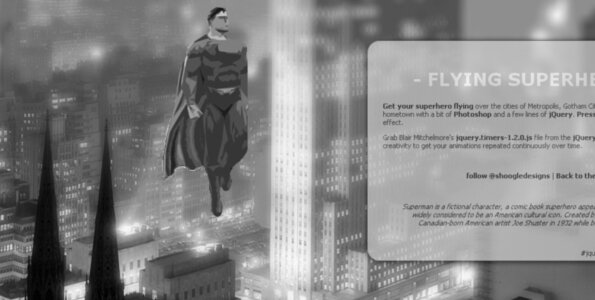
So here’s the challenge: Let’s get a Superman flying over the city using a bit of Photoshop work and a few lines of jQuery.
Photoshop
I must admit creating a very rough animated Superman (and his cape) was easy peasy compared to what I had to go through to find (and setup) a neat city view, but as I wasn’t sure of what I was looking for in the first place, therefore no wonder it took me so long.
Didn’t do too much in terms of effects for the landscape. Once I had decided to go for dark setup and a desperately-hurting but yet magnificent view of New York’s Ground Zero, I worked a bit on the hue and saturation of the picture, but most importantly I applied some much-needed gradient blurring effect so the viewer does focus on the front of the picture and the superman icon.
Superman, meanwhile, was (as you have guessed) roughly prepared in black and white style and a transparency background, with a good contrast, while an animated cape was given to him thanks to the Window/Animation feature of Photoshop. If you don’t know how to make GIF’s using Photoshop, I let you google it, I didn’t know myself, but it’s dead simple.
jQuery
Right, let’s get our hands dirty with the important stuff, the jQuery coding of all of this. I have to confess as I have already done it many times. Im not a programmer, never been, and never will be. I however am very grateful to people who allow people (with creativity but no real technical expertise like me) to use their work and finally give some visual sense to their tortured or just extensive imagination.
In this example of a flying superman, I was looking for a way to loop an animation with jQuery and found this cool jQuery plugin, made by Blair Mitchelmore and apparently licensed under the WTFPL – or commonly known as Do What The Fuck You Want To Public License lol…
Anyway here we go with the coding:
Include as usual your jQuery package, and add a line for the jQuery.timers script as shown below.
In terms of getting the superman continuously flying over time, I used a div (of id superman) and got it oscillating along the Y-axis between coordinates 95px and 100px (this obviously depends on the way you want your picture to look like) thanks to two successive .animate functions. Note that I gave my superhero different speeds as he will fly up in to top point in 500ms while he will fly down to his bottom limit in 400ms only.
Hope you enjoyed this little tutorial. I let you check out the demo (Press F11> for best effect) and download the files if you do want to use it for your own looping animations.
This is quite nice. Reminds me the good old times
Thanks Michael.

Pretty cool, I might find a use for this.
SUPERMAN FTW
Hi shoogle,
Im just curious I would could you adapt the effect to a button that on mouse over would freeze the superman, but on mouseout your continuous loop would continue play.
regards
bro
Hi Bromel,
this would need some investigation, but i guess your answer is around that kind of coding:
http://forum.jquery.com/topic/cycle-plugin-how-to-pause-the-animation-onmouseout-and-resume-it-onmouseover-exact-opposit-of-pause-1
rgds,
Shoogle Designs
Thank you shoogle