We love marking life’s events. It’s what life is all about after all, a series of joyful, sad, dull, or exquisite moments. Business life isn’t any different. From the first customer to the 5-year anniversary of the company, the lives of our beloved businesses are also marked by step stones.
This is why sometimes, as website owners, it is nice to get intimate with our visitors by bringing up an interesting yet crucial fact about our site or activities. A new partnership, an important change, or just a ‘thank you note’ on a special event like an anniversary are indeed worth flagging.
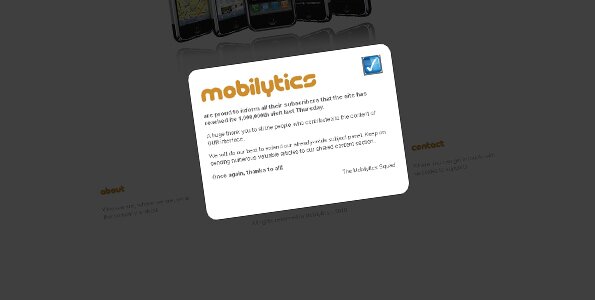
Of course, there are many ways to deliver your followers such messages. And when it comes to communication, it is more than likely that a site owner will be using more than one technique to do so: Emails can be sent, new pages can be designed, and tweets (or other social media links) can be triggered but I find the usage of informative modal windows upon site entry quite convenient, and sooooo much more sexier than the brutal pop up windows or alert boxes.
It is likely you may already be using modal windows for your contact forms, or to display in detail your portfolio or other various pictures, but instead of using an obscure ready-to-use script or plugin, I’m going to show you how to quickly code a sexy modal window in jQuery (in less than 20 lines), which you may use on your site’s index page (or elsewhere) to display a message for a special date/event, and which will require the interaction of your visitors before they can browse the rest of your site.
If you’ve read my post about pushing the minimalist approach (more details here), you will recognize the now-famous but yet fake Mobilytics website I’m gonna be using for this demonstration.
Right, folks. Let’s put our thinking hats on.
We are going to need for this:
- a layout for a semi-dark mask to partially-hide the index page (CSS)
- a way to send the index page behind this mask while we show the modal window (jQuery)
- a layout for the modal window (CSS)
- a position for the modal window (jQuery)
- a way to make the modal window appear by default upon entry (jQuery)
- a way to end the modal window process when the visitor clicks on the close button OR anywhere on the mask (jQuery)
Right, Let’s get cracking then.
I’m gonna pass on the CSS lines regarding the layout of the site, and just concentrate on the lines regarding the mask and the modal window.
#dark                {
                         display: none;
                         background-color:#000;
                         position:absolute;
                         left:0;
                         top:0;
                         z-index:100;
                        }
#message           {
                          display:none;
                          position:absolute;
                          left:0;
                          top:0;
                          z-index:101;
                          width:350px;
                          height:250px;
                          background-color:#FFFFFF;
                          border:1px solid #333;
                          -moz-border-radius: 20px;
                          -webkit-border-radius : 20px;
                          padding: 20px;
                          color: #666666;
                         }
Up to you to change those settings and adapt them to your own requirements/preferences.
As you can see, I’ve given the dark mask a z-index of 100 and the modal window a z-index of 101, for obvious reasons. Note the border radius of the modal window, which will give it a sexier appeal.
jQuery code
Ok so let’s take this in the coming order:
I’m using variables WindowHeight and WindowWidth to:
- determine the size of the screen, and report those two onto the css of the mask (so it covers the full screen).
- center the modal window according to both the screen and the CSS-set sizes of the informative modal window.
Let’s give the dark mask a fading speed and an opacity level…
$('#dark').fadeTo(2000,0.75);
… apply the same principles (with no opacity this time) to the modal window:
$('#message').fadeIn(2000);
And finish it off with a couple of commands to end the modal window process (both mask and modal windows then fade out), when:
a) Visitor clicks on the picture which we setup with a .close class
$('.close').click(function() {
$('#dark').fadeOut();
$('#message').fadeOut();
Or b) Visitor clicks on the dark mask
$('#dark').click(function () {
$('#dark').fadeOut();
$('#message').fadeOut();
Easy peasy, isn’t it?
Check the demo and good usage of this technique if you decide to implement it on your site(s). Download files here.

My name is Flo Preynat and I am the freelance webdesigner and developer behind shoogle designs. I live in France and specialize in responsive web design. Give me a shoogle or get in touch with me on twitter.
Follow @shoogledesigns


Thanks for this tut, mate Did a RT
Great tutorial!
How can I alter the code to make this pop up be activated in a link and onclick action in the page?
Thanks.
Hi Tim,
first of all, thanks for the compliment.
here’s some plugin that may be simpler for you to use/configure.
http://www.ericmmartin.com/projects/simplemodal-demos/
first example is the one you’re looking for…
Hey man
This is certainly very fantastic. But, always the “but” :), the window is a bit jerky in IE7 and 8! Is there a way to fix the rounded corners for IE7 and 8?
I was very excited bu this script but I was horrified when I looked at in the horrible IE, huh.
Can you fix it pls? The close button image also seems to be missing in IE!
Ben
well huh, I download your script from another website and the close button is generated by js. I guess they modified your code!!!
The black overlay effect has disappeared? Am loading these js on my page:
$(document).ready(function(){
$(“img.a, img.c, img.e, img.g”).hover(
function() {
$(this).stop().animate({“opacity”: “0”}, “slow”);
},
function() {
$(this).stop().animate({“opacity”: “1”}, “slow”);
});
});
curvyCorners.addEvent(window, ‘load’, initCorners);
function initCorners() {
var settings = {
tl: { radius: 10 },
tr: { radius: 10 },
bl: { radius: 10 },
br: { radius: 10 },
antiAlias: true
}
/*
Usage:
curvyCorners(settingsObj, selectorStr);
curvyCorners(settingsObj, Obj1[, Obj2[, Obj3[, . . . [, ObjN]]]]);
selectorStr ::= complexSelector [, complexSelector]…
complexSelector ::= singleSelector[ singleSelector]
singleSelector ::= idType | classType
idType ::= #id
classType ::= [tagName].className
tagName ::= div|p|form|blockquote|frameset // others may work
className : .name
selector examples:
#mydiv p.rounded
#mypara
.rounded
*/
curvyCorners(settings, “#accordion-1″);
}
$(function() {
/*
fancybox init on each cloud-zoom element
*/
$(“#content .cloud-zoom”).fancybox({
‘transitionIn’ : ‘elastic’,
‘transitionOut’ : ‘none’,
‘speedIn’ : 400,
‘speedOut’ : 200,
‘overlayShow’ : true,
‘overlayColor’ : ‘#000′,
‘cyclic’ : true,
‘easingIn’ : ‘easeInOutExpo’
});
/*
because the cloud zoom plugin draws a mousetrap
div on top of the image, the fancybox click needs
to be changed. What we do here is to trigger the click
the fancybox expects, when we click the mousetrap div.
We know the mousetrap div is inserted after
the we want to click:
*/
$(“#content .mousetrap”).live(‘click’,function(){
$(this).prev().trigger(‘click’);
});
/*
the content element;
each list item / group with several images
*/
var $content = $(‘#content’),
$thumb_list = $content.find(‘#thumb > ul’);
/*
we need to set the width of each ul (sum of the children width);
we are also defining the click events on the right and left arrows
of each item.
*/
$thumb_list.each(function(){
var $this_list = $(this),
total_w = 0,
loaded = 0,
//preload all the images first
$images = $this_list.find(‘img’),
total_images= $images.length;
$images.each(function(){
var $img = $(this);
$(”).load(function(){
++loaded;
if (loaded == total_images){
$this_list.data(‘current’,0).children().each(function(){
total_w += $(this).width();
});
$this_list.css(‘width’, total_w + ‘px’);
//next / prev events
$this_list.parent()
.siblings(‘.next’)
.bind(‘click’,function(e){
var current = $this_list.data(‘current’);
if(current == $this_list.children().length -1) return false;
var next = ++current,
ml = -next * $this_list.children(‘:first’).width();
$this_list.data(‘current’,next)
.stop()
.animate({
‘marginLeft’ : ml + ‘px’
},400);
e.preventDefault();
})
.end()
.siblings(‘.prev’)
.bind(‘click’,function(e){
var current = $this_list.data(‘current’);
if(current == 0) return false;
var prev = –current,
ml = -prev * $this_list.children(‘:first’).width();
$this_list.data(‘current’,prev)
.stop()
.animate({
‘marginLeft’ : ml + ‘px’
},400);
e.preventDefault();
});
}
}).attr(‘src’,$img.attr(‘src’));
});
});
});
The script works well (except for background overlay) in Firefox and IE7 but not in IE8?
Any idea to correct this?
these also are being loaded
well the codes are being chunked
Hi Ben,
thanks for your comments.
Apart from the round corners (didnt bother to look at that side for IE), everything works.
Ive tested it myself in IE8 and it’s all looking ok to me.
rgds,
shoogle designs
How can we show it only once per visitor ?
Now it show on all pages …
Thanks very nice modal window …
Hi Gugu,
you’re gona have to work this around cookies I guess. I didn’t (and still don’t) want to cover this area.