I’ve been using Sublime Text 2 for a few months now, as it’s mega fast, it supports multi-selection, and it’s got cool features like the distraction-free editing mode. In 4 words, “I fucking love it”.
Since i’m far from the only one getting hooked on the app as the text editor for code is becoming more and more popular, I thought I would share a couple of things with you.
Sublime Package Control
For those of you who still wouldn’t know it, Sublime Text 2 can be ‘equipped’ with a full-featured package manager helping you discover, install, update and remove packages (on top of this, it supports GitHub).
To install it, follow the Instructions stated here. I personally went for a manual install as shown below:
- Click the Preferences > Browse Packages… menu entry
- Browse up a folder and then into the Installed Packages folder
- Download Package Control.sublime-package and copy it into the Installed Packages directory
- Restart Sublime Text
Livereload
You may know about the LiveReload app monitoring changes in the file system, and refreshing the browser as soon as the file change has been saved. You can find the app and links to the mac app store and browser extensions here.
However, I stumbled upon another way of using the same functionality Livereload offers and this with Sublime Text 2. First of all, let’s install the Livereload package by using the package control (recently installed).
To do this, got to Preferences/Package Control and select Install Package as shown below.

Type Livereload and double click the package to install it.

Once installed, install the Livereload extension/add-on of your preferred browser.
- If you are using Chrome like me, go there. Note: If you want to use it with local files, be sure to enable “Allow access to file URLs” checkbox in Tools > Extensions > LiveReload after installation.
- For firefox lovers, select the followin add-on.
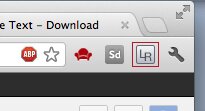
This done, all ou need to do is activate the Livereload extension by clicking the toolbar button (it will turn green to indicate that LiveReload is active), and fire away your changes in your code editor.
Practical example
I have downloaded the 320andup responsive boilerplate of Andy Clarke and placed it in my MAMP htdocs folder.
The chrome extension activated (green button), I can now edit the various 320andup files and see the changes happen live on the browser without refreshing it. In this case, I simply went with a brutal background change on the css file and saved it.
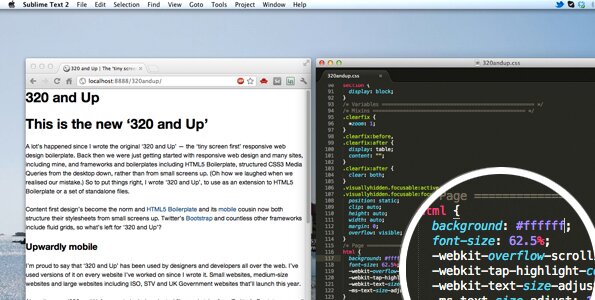 - Before Making a change on the CSS file –
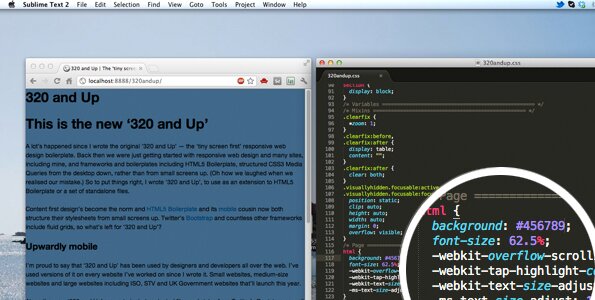 - After (simply) saving the change of the CSS file -

My name is Flo Preynat and I am the freelance webdesigner and developer behind shoogle designs. I live in France and specialize in responsive web design. Give me a shoogle or get in touch with me on twitter.
Follow @shoogledesigns


Very cool post. I will definitely try adding the livereload sublime text 2 plugin!
Unfortunately the livereload does not work and hasn’t for a while. Sublime text 2 however is awesome. I just use the compass app to watch the folders and the FTP connection with Sublime text and it works great. I wasted a lot of time on livereload until I tried the compass app.
Thanks for the tip, but it doesn’t work here. I installed the package in Sublime Text 2, added the LiveReload plugin to Chrome (and enabled “Allow access to file URLs”) and restarted Sublime Text 2. But nothing happens in the browser when I change an HTML or CSS file. Any hints? Maybe it doesn’t work in Windows?
Hi Christian,
you have to work locally, hence use a local server environment. I use Mamp on my mac (if you are on a windows machine, you can go with xampp).
If you don’t want to go that route, then you can download the paid Livereload app, i think it’s just under 10 bucks ask it to watch a specific folder (incl. non-localhost ones).
Hope this helps mate,
Yep, this also doesn’t work for me on Windows. I’m trying it locally (both direct file access and XAMPP server). I see ST flash (Sent LiveReload command…), the extension is turned on and green, but nothing reloads… Once we have to suffer on Windows
just thought i would precise that the following setup does work with windows. For your info, I use it on both mac os x and windows 7 environments. I hope you find your issue Jakub!
I just bought LiveReload & I could have used this. Wish Sublime Text 2 had a FTP tool like Coda.
Andre, hard luck mate. I was pondering the idea myself, but i’m pretty pleased with this setup. I do agree the FTP management has got to be on ST2’s new features list!
Install SFTP package. Very powerfull tool.
Aleks, thanks for your comment.
I agree it’s a powerful tool. It’s coming in a future post as I really like it. But it’s not as handy as the ftp management feature of Coda for example.
Hi Andre, ST2 does actually have a great package you can use for FTP – it’s called “SFTP.” I use it all the time and it works great – super fast too. Hope this helps.
Opera users can grab this Livereload extension https://addons.opera.com/en-gb/extensions/details/livereload-201-beta/?display=en
Users of current shipping versions of Opera (pre 12.50) will need to enable web sockets opera:config#UserPrefs|EnableWebSockets (they’re turned on by default from Opera 12.50)
bruce lawson
Opera developer relations team
Thanks for this, Bruce. Brilliant.
I noticed when I edit CSS, it does not reload entire document, it just updates CSS live.
When I edit HTML or PHP, it does reload page (so all .load() scripts will run!)
Thanks for the post!
New user to sublime text 2. I am trying to get my .php files to open in the browser. Right now they just get downloaded. Coda seems to have this functionality so can’t understand why sublime text 2 doesn’t?
Antonio, thanks mate.
Why would that be linked to sublime text 2? Not following you there. How do you open your file from ST2.
Very simple and easy to package livereload sublime text. A productivity gain of Front-end Engineer
Hi there! I also tried to use sublime-livereload with Win7 64. Installed the plugins in FF and Chrome. When I activate them I get the “client connected” in the Sublime Text status bar. But when I hit save nothing happens! Are there any dependencies like ruby, python … any other software apart from a clean Windows machine?
Also when I try to enable / disable livereload plugins like less preprocessor, it doesn’t work. The settings file entry enabled_plugins stays empty.
Any hints how I can get this to work? Seems like quite a few folks have the same problem.
Cheers!
Hi Max, to be honest, I’ve moved away from Livereload a long time ago.
Won’t you consider using another tool, like codekit, prepros or mixture.
They can so much better than live refresh.
For me doesn’t work Sublime Text 3 – LiveReload extensions (Firefox, Chrome, Safari) I don’t know why? I use MAMP.
Please help me!
Sorry, Mary, I don’t use ST3 personally.
Any Sublime Text 3 users wanna help?
Yeah livereload hasn’t worked well for some time now. For Firefox I suggest this Auto Reload 1.19 add-on. Works just like livereload if not better when using sublime text or nay editor for that matter. As for Chrome I still have not found an extension that actually works.