I am a huge fan of Codekit. I don’t have enough words to praise Bryan (who is such a cool guy) and his dev tool, and since I work 95% of my time on Apple, Codekit is AND does all I need as far as my Sass is concerned.
But I happen to use windows machines every now and then, and although using the command lines “compass create” and “compass watch” is far from rocket science, I do miss Codekit’s features so much when I’m on Windows environments.
Huge news this week for Windows folks (sorry if I’m late to the party). A clever guy (Subash Pathak, you can give him some love here) released a free windows version of a Codekit-like app, named Prepros, and I thought I would give it a go.
Be aware that I’m only testing Sass here. Prepros looks like it compiles a number of other languages including the likes of coffee script, jade (whatever this is lol), and more, but I’m not touching those.
Install
Let’s get cracking then. There’s not a huge amount of documentation on the site, but install and use are easy enough. Grab the app by downloading it (green button), and run the .exe.
Save the Live Browser refresh chrome extension in your files, open your chrome extension page (chrome://extensions), grab the saved extension file and drop it on the extension page.
Then it’s dev time. Go ahead and create a test folder. And add it to Prepros by dragging it onto the app (or use the + icon to locate the folder). The moment you add an scss folder and a file in it, Prepros will automatically recognize it and create a config.rb file and a .sass-cache folder.
Update: As some of you pointed it out in the comments, Prepros doesn’t deal with config.rb nor sass-cache files/folders. I only got those files because I was testing on an environment with ruby and Sass pre-installed. Therefore you can start with a windows environment free of those. Prepros will take care of the compiling itself.

Create a css folder. You can adjust the name of your css, img and js folders right on Prepros.
Live Refresh
1. Make sure you tick the “Allow Access to file URLs” checkbox in your chrome extensions settings
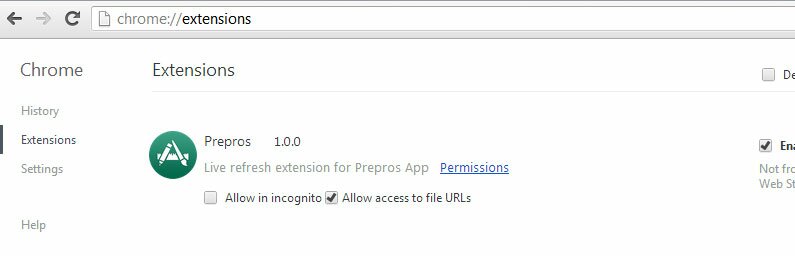
and 2. do not open your html straight from the browser or by choosing open file with following a right click. Use Prepros’ ‘Open project live url’ as Subash stated it in the FAQ. Change your files and watch your html getting refreshed automatically.

Verdict
Very much impressed with Prepros. We were promised a free version of Codekit for Windows, and the least we can say is we did get that. Well done Subash!

My name is Flo Preynat and I am the freelance webdesigner and developer behind shoogle designs. I live in France and specialize in responsive web design. Give me a shoogle or get in touch with me on twitter.
Follow @shoogledesigns


Please update your article as there are a few items that are not correct.
You state “The moment you add an scss folder and a file in it, Prepros will automatically recognize it and create a config.rb file and a .sass-cache folder.”
This is not correct. Prepros does not generate any config.rb file. You can create one but it must be in the project root folder in order to be used – as of version 1.4.0.
Also, Prepros does not create any .sass-cache folder that I’m aware of.
Hi Chad,
True I started with a windows environment with ruby and Sass installed in the first place.
That’s pretty exciting news. I spend a lot of time hopping between platforms, and have been searching for a Codekit alternative for Windows for a long time now. This really helps ease the pain when away from Mac.
+1 on easing that pain, David. Prepros does just that… Thanks for your comment mate.
I’ve been using Mixture for a couple of months or so, but I’ve tried proprso after reading this and it seems a lot more lightweight, does all that I need, and importantly it’s as close to Codekit as it can be.
Hey Shaun, been using Codekit for what it seems forever now, and Prepros is truly as close to it as you can get.
Haven’t you heard of Scout? An app, also free and it’s been around for some time now. It is not an extension, which i call a point in its favor and works like a charm.
Does the same things, btw.
Hi Robert, yeap I’m aware of Scout. As i stated it, I’m only looking at Sass but that doesn’t mean other languages should be forgotten. Codekit and Prepros compile everything from less, jade, haml, etc when Scout only deals with Sass/Compass.
Hence the comparison.
This is a really good app. The latest version 2.0.1 at this time runs really fast because they dropped livereload for non compiled html/css/js but compiled files will livereload the page as usual. It’s a good thing IMHO to let the pre-processor do it’s job (pre-processing) and use something else for livereloading regular files. Either use the livereload app (available in beta for windows now) or something like node-live-reload along side prepros.
As a windows user I thought it was funny to start seeing requests for a mac osx version of prepros since they already have codekit but then I realized prepros is free but codekit isn’t.
… although getting the awesomeness of Codekit for a one-time fee of $25 is not much, you’ll have to admit.
Thanks for your comment Ian.
Hi mate,
Great article, I just stumbled across PrePros today after helping a colleague with sass as he’s on a Windows machine. I almost felt sorry for the guy because he couldn’t use CodeKit which I use as I’m a long time mac user.
I did the old google search for “sass compiler for windows” and this was the first result! I was happy to let him know there is a good preprocessor available for windows, I personally couldn’t live without CodeKit until what I saw PrePros was like today! Great news for window devs!
You still do feel sorry for them though…lol
Thanks Nick.
Just stumbled on this post and installed Prepros on my Win7 machine and it keeps crashing after 10-40 seconds of running. Any idea on why that is happening? Or better yet, has anyone had this same problem (I know it’s not the right place to post this too but any help is good)?
It seems like it would be just what I was missing from my workflow (if it works right).
Hi Eddie,
I can’t say I have tested the app long enough to have recurring problems… But for sure, I didn’t get that kind of issues from the word go, as I installed and tested Prepros on a Win7 machine without problems.
Maybe you should log an issue with Subash using Prepros’ dedicated github account.
It’s defo the best place for this.
Hope it’ll get sorted.
Thanks SHOOGLEDESIGNS.
I did that just now and I hope it gets fixed. For anyone who might have the same problem, the post is here https://github.com/sbspk/Prepros/issues/242
I had a large Less project already compiling successfully using WinLess, but there were a few issues and desired features with WinLess that made Prepros attractive. However, the first time I attempted to compile with Prepros it failed (unexpected token), citing a perfectly valid line of CSS as the issue. With no more detail, I could not proceed.
It was suggested by Subash that the issue may be a “weird selector” or a “Less bug”, but I am puzzled as to how this could be given that WinLess uses the original Less compiler and has compilled the Less code successfully.
I have just attempted to compile an existing and successfully compiled SASS project and Prepros is deciding which .scss files to load/show in the listing. I cannot see the logic by which it is omitting some and not others, although it does seem to be ignoring all .scss files of the form “_filename.scss”.
If I drop a folder of .scss files onto area labelled “Please drag and drop a folder to start a new project.” I expect all scss files, regardless of their filenames and content, to appear in the file listing. It should then be up to me to decide whether to compile each file and how.
I hate to be down on this app because it does look very slick. However, it has been very problematic for me on the only two projects I have tried it on and both projects were previously successfully compiled on WinLess and CodeKit.
I will register these issues on github.
Hi Guys Im coming from a mac need to dev on pc for work but which do you guys prefer for windows prepros or scout and why? I will just be working with sass / zurb foundation mostly and would like as little as possible that can deal with that.
Hi Ryan,
you can indeed use any of those.
Personally, I would use Grunt if I was to use a windows machine.
@shoogledesigns So, with your answer to Ryan, your saying don’t bother with Prepros anymore, just use Grunt. Is that correct? And why did you change your mind on using Prepros?
Hi Danny,
I have always loved using Codekit, it’s been my goto tool from the start. At the time, grunt and gulp were not as popular. If I had to start developing on a windows machine today, and considering my experience on those tools, I defo would go with them as opposed to a paid package, that’s all.
Thanks for the write-up on this, I came across Codekit but unfortunately, I’m not a Mac user – Prepros seems awesome.
I will be looking into it but I’ll also be experimenting with Gulp (as well as a few other compilers) soon after.
Joshua